
OAuth2 authentication
Every request to the tastytrade API is authenticated with an OAuth2 access token
in the Authorization header. All API users must use OAuth2 — the legacy
POST /sessions flow was
decommissioned in 20260211.
Short-lived scoped tokens are the reason. A 15-minute access token limited to specific permissions gives an attacker a very small window and only the resources that token was authorized for. A 24-hour session token gives them a day with potentially full account access.
Base URLs
Sandbox and production are fully separate, with their own credentials and data.
| Environment | Base URL |
|---|---|
| Production | https://api.tastyworks.com |
| Sandbox | https://api.cert.tastyworks.com |
A client and refresh token registered in one environment will not work in the other. See Sandbox for what else differs.
Every request needs a User-Agent
All requests, including the OAuth calls below, must send a User-Agent header
or they are rejected. The format is product/version. The product and version
you pick do not matter as long as the format is right — most people make it
specific to their client, like tastytrade-api-client/1.0 or
my-custom-client/2.0.
Step 1 — Create an OAuth application
On my.tastytrade.com, go to Manage → My Profile → API → OAuth Applications and click + New OAuth client.
- Client Name is prefilled with your tastytrade username.
- Redirect URI, one per environment requested. Multiple URIs are allowed, and
each must be a full URI —
https://www.my-redirect-uri.comis valid,my-redirect.comis not. - Scopes:
read,trade,openid.
On creation you are shown your Client ID and Client Secret.
The client secret is shown once. Store it securely before clicking Finish Setup; it cannot be shown again. If you need a new one, use Regenerate at the top of the page — note that this invalidates any active grants.

Step 2 — Generate a personal grant
For your own application you do not need the full authorization flow. Go to Manage → My Profile → API → OAuth Applications, click Manage next to your application, then Create Grant. This shows your grant's refresh token.
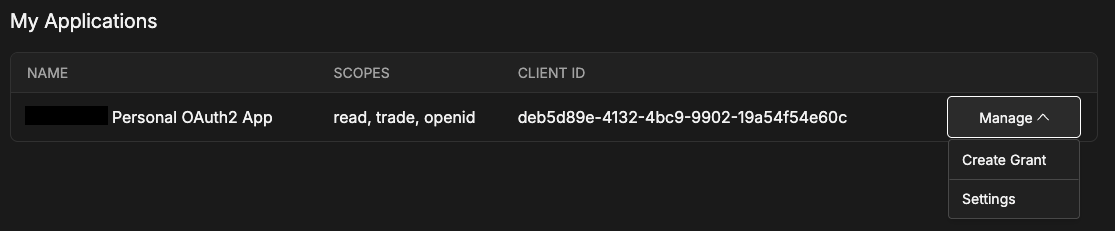
Refresh tokens are long-lived and do not expire. If you lose one or it is compromised, delete the corresponding grant on the API page of my.tastytrade.com and create a new one — a new grant issues a new refresh token.
Step 3 — Exchange the refresh token for an access token
curl -X POST https://api.tastyworks.com/oauth/token \
  -H "User-Agent: my-custom-client/1.0" \
  -H "Content-Type: application/json" \
  -d '{
    "grant_type": "refresh_token",
    "refresh_token": "YOUR_REFRESH_TOKEN",
    "client_secret": "YOUR_CLIENT_SECRET"
}'grant_type, refresh_token and client_secret are required. client_id is
optional — the server infers it from the refresh token, but if you send it, it
must match. An optional space-separated scope requests a subset of your grant's
scopes.
The response contains a new access_token. Refreshing does not rotate your
refresh token: none is returned, and the one you hold stays valid for the life of
the grant.
Access tokens are signed JWTs valid for 15 minutes. An expired token returns HTTP 401. Refresh on a schedule, or lazily just before expiry, rather than on every request.
Step 4 — Send the token on every request
GET /accounts/{account_number}/positions HTTP/1.1
Host: api.tastyworks.com
Authorization: Bearer YOUR_ACCESS_TOKEN
User-Agent: my-custom-client/1.0
Accept: application/json
Real access tokens are far longer than that placeholder.
Third-party applications
Everything above covers using your own application against your own account. A personal OAuth application is restricted to your account only — you can build and test, but other tastytrade users cannot connect to it.
To let other users authorize your application you must complete tastytrade's trusted third party verification, which reviews how your application handles data and protects users. Contact api.support@tastytrade.com to start.
The rest of this section applies only to verified third party applications.
User authorization
tastytrade supports the OAuth2
authorization code grant.
Once approved, direct users to https://my.tastytrade.com/auth.html
(sandbox: https://cert-my.staging-tasty.works/auth.html) with:
| Parameter | Required |
|---|---|
client_id | yes |
redirect_uri | yes |
response_type | yes |
scope | no |
state | no |
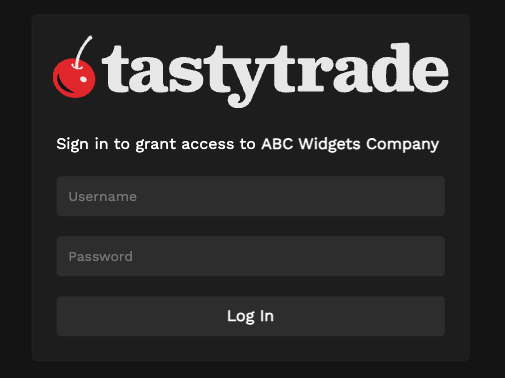
On success the user is redirected to your redirect_uri with code (the
authorization code) and state as query parameters.
Exchange the code for tokens
curl -X POST https://api.tastyworks.com/oauth/token \
  -H "User-Agent: my-custom-client/1.0" \
  -H "Content-Type: application/json" \
  -d '{
    "grant_type": "authorization_code",
    "code": "AUTHORIZATION_CODE",
    "client_id": "YOUR_CLIENT_ID",
    "client_secret": "YOUR_CLIENT_SECRET",
    "redirect_uri": "https://www.my-redirect-uri.com"
  }'
The response contains:
| Field | Meaning |
|---|---|
access_token | Send as a bearer token on each request |
refresh_token | Never expires |
token_type | Bearer |
expires_in | Seconds the access token remains valid |
id_token | Only returned when using the openid scope |
Refresh works the same as Step 3. If a third-party refresh token is lost or compromised, contact tastytrade API support immediately.
Two-factor authentication
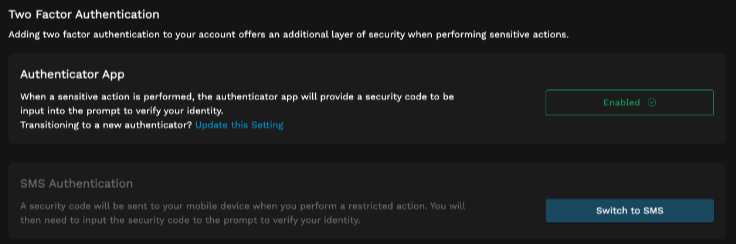
For sensitive scopes — currently read and trade — customers must have
2FA enabled to grant an application access. Customers enable it under
My Profile → Security with
either an authenticator app or SMS.
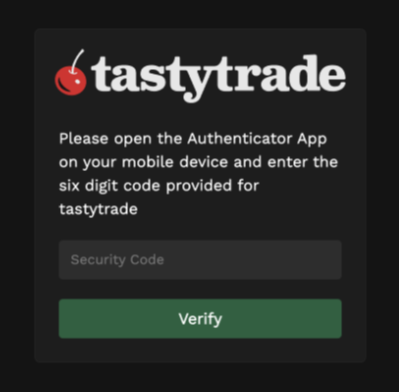
During authorization, after entering credentials and clicking Login, the customer is prompted for their 2FA code.
What can go wrong
- 401 Unauthorized — no
Authorizationheader, or the token is missing, invalid or expired. Refresh and retry. - 403 Forbidden — the token is valid but not authorized for that resource:
an account belonging to another customer, or a scope that does not cover the
operation. Reads need
read, mutations needtrade. - 406 Not Acceptable — the
Accept-Versionyou sent no longer exists. See API versions. - 429 Too Many Requests — back off and retry. See Rate limits and backoff.
Error responses carry an error object with code and message. The full status
code list is at /reference/errors.
Notes for money-moving requests
Run orders as a dry-run first, then submit with a unique external-identifier so
you can recognise the order later. There is no idempotency-key header and the API
does not deduplicate retried submissions. If a submission's outcome is uncertain
after a timeout or 5xx, check GET /accounts/{account_number}/orders (or
/orders/live) for your external-identifier before resubmitting. See
Idempotency and retries.
Related
- Quickstart — your first authenticated call.
- Sandbox — separate credentials, and how fills are simulated.
- API versions — the
Accept-Versionheader. - MCP server — let it manage tokens for you.